
A financial calculator sounds like one simple tool. It’s actually many different tools for different decisions. Here’s which one fits your situation, and the real limitation most calculators don’t spell out clearly.
Quick Answer: Which Financial Calculator Do You Need?
Use a mortgage calculator for home loans. Use a personal loan calculator for smaller loans. Use a budget calculator to track spending. Use a savings calculator to plan a goal. Most calculators only give an estimate. They leave out fees like establishment charges and account-keeping costs. They also don’t check if you can afford the repayments. They just check if the numbers add up on paper. Treat the result as a starting point, not a guarantee.
Which Calculator Fits Your Situation
- Buying a home? Use a mortgage or home loan repayment calculator. It estimates monthly repayments from the loan amount, interest rate, and term.
- Comparing a personal loan? Use a personal loan calculator. It works the same way, but for smaller amounts and shorter terms.
- Tracking everyday spending? Use a budget calculator or planner. This maps your income against your expenses. It’s not built for loans.
- Saving toward a goal? Use a savings calculator. It shows how a regular deposit grows over time with interest.
- Working out stamp duty or tax? Use a dedicated stamp duty or income tax calculator. These follow specific formulas a general loan calculator won’t cover.
What a Financial Calculator Actually Excludes
- Most calculators leave out fees. Government guidance says this plainly: a typical loan calculator excludes establishment fees and ongoing account charges.
- This means your real repayment is often higher. A calculator showing a clean number skips the extra costs layered on top of a loan.
- Ask for the comparison rate too. A comparison rate factors in most fees. The calculator’s base estimate usually doesn’t.
- Some calculators cap the loan term. A term longer than the calculator’s maximum, often 15 years, won’t be modelled accurately.
The Bigger Limitation: It Doesn’t Check If You Can Afford It
- A calculator shows what the repayments would be. It doesn’t say whether you should take them on. It’s a model, not a recommendation.
- It doesn’t look at your income, expenses, or other debts. Two people with the same loan amount could have very different room to repay it.
- Treat it as one input, not the final word. Combine the calculator’s estimate with a real look at your own budget before you decide.
- A lender’s own check will differ. Their serviceability check looks at far more than a simple online calculator does.
A Real Example: Why the Fee Exclusion Matters
- Say a calculator estimates a $500 monthly repayment on a personal loan. That figure usually skips the establishment fee, which can run into hundreds of dollars upfront.
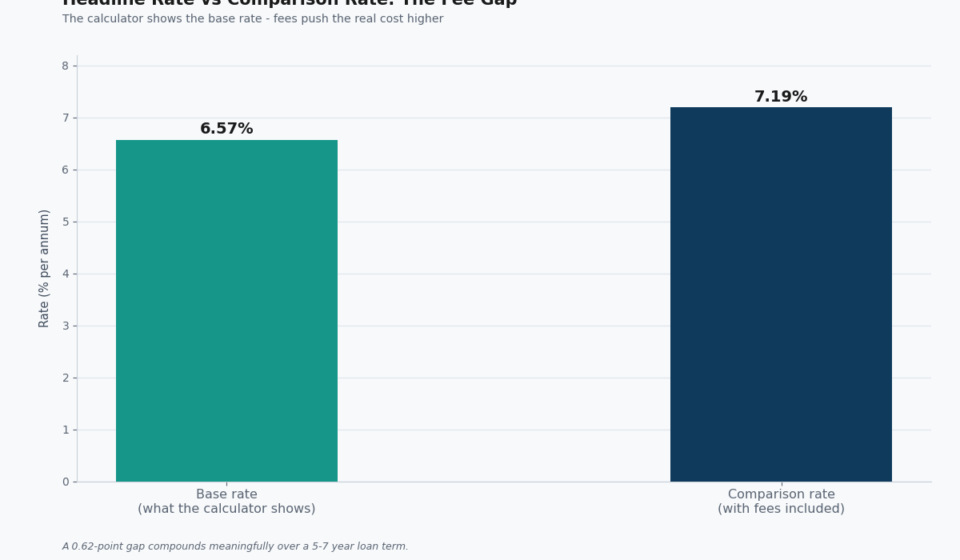
- The comparison rate shows the fuller picture. Say the base rate is 6.57% but the comparison rate is 7.19%. That gap reflects fees the calculator’s headline number left out.
- Small gaps add up over a long term. Even a small fee difference compounds meaningfully over a 5-7 year loan.
- Always compare comparison rates, not headline rates, across lenders. It’s the only way to see the real cost side by side.
Getting the Most Out of a Financial Calculator
- Run the same numbers across two or three calculators. Results can vary slightly depending on how each tool rounds or models interest.
- Adjust the term and see how repayments shift. A longer term lowers the monthly repayment but raises the total interest paid.
- Use it as a starting point for a real conversation. Bring your estimate to a lender or broker rather than treating it as the final number.
- Recheck your numbers if rates change. A calculator result based on an old rate won’t reflect what you’d actually pay today.
FAQ: Financial Calculator
Which financial calculator should I use for a home loan?
A mortgage or home loan repayment calculator, which estimates monthly repayments based on the loan amount, interest rate, and term.
Do financial calculators include all fees?
No. Most exclude establishment fees and ongoing account charges, so your real repayment is often higher than the calculator shows.
Does a financial calculator tell me if I can afford a loan?
No. It only models the repayment figures. It doesn’t assess your income, expenses, or ability to actually make the repayments.
What’s the difference between a calculator’s base rate and comparison rate?
The base rate is the headline interest rate. The comparison rate factors in most fees, giving a more realistic picture of the total cost.
Should I trust one calculator’s result completely?
No. Run the same numbers across two or three calculators, and use the result as a starting estimate rather than a final answer.
You may also like
 Home Equity: What It Is, What You Can Access, and What It’s Not
 Wage Advance: The Real Cost Range (2026 Guide)
 Payright: What “Interest-Free” Actually Costs Over Time
 Offset Calculator: The Formula You Can Do Yourself, No Tool Needed
 Bad Credit Car Loans Australia: The Real Rate Range and What Actually Helps
 Our Money Market Personal Loans: The Real Current Rate, and What Customers Actually Say
Related posts:
Home Equity: What It Is, What You Can Access, and What It’s Not
Wage Advance: The Real Cost Range (2026 Guide)
Offset Calculator: The Formula You Can Do Yourself, No Tool Needed
Payright: What “Interest-Free” Actually Costs Over Time
Bad Credit Car Loans Australia: The Real Rate Range and What Actually Helps